Build a single threaded HTTP Server in Java
As a backend developer / enthusiast, you may find yourself needing to create a simple HTTP server for various purposes, such as testing, prototyping, or learning about the HTTP protocol. While there are many libraries and frameworks available that can help you build an HTTP server quickly, but have you even wondered how web servers work ? how they handle HTTP requests and responses under the hood?
If so, then let’s deep dive into the internals of it , we will even see each and every small components & try to connect the dots between them , so without further ado , let’s get started !
Everything starts from OS & TCP
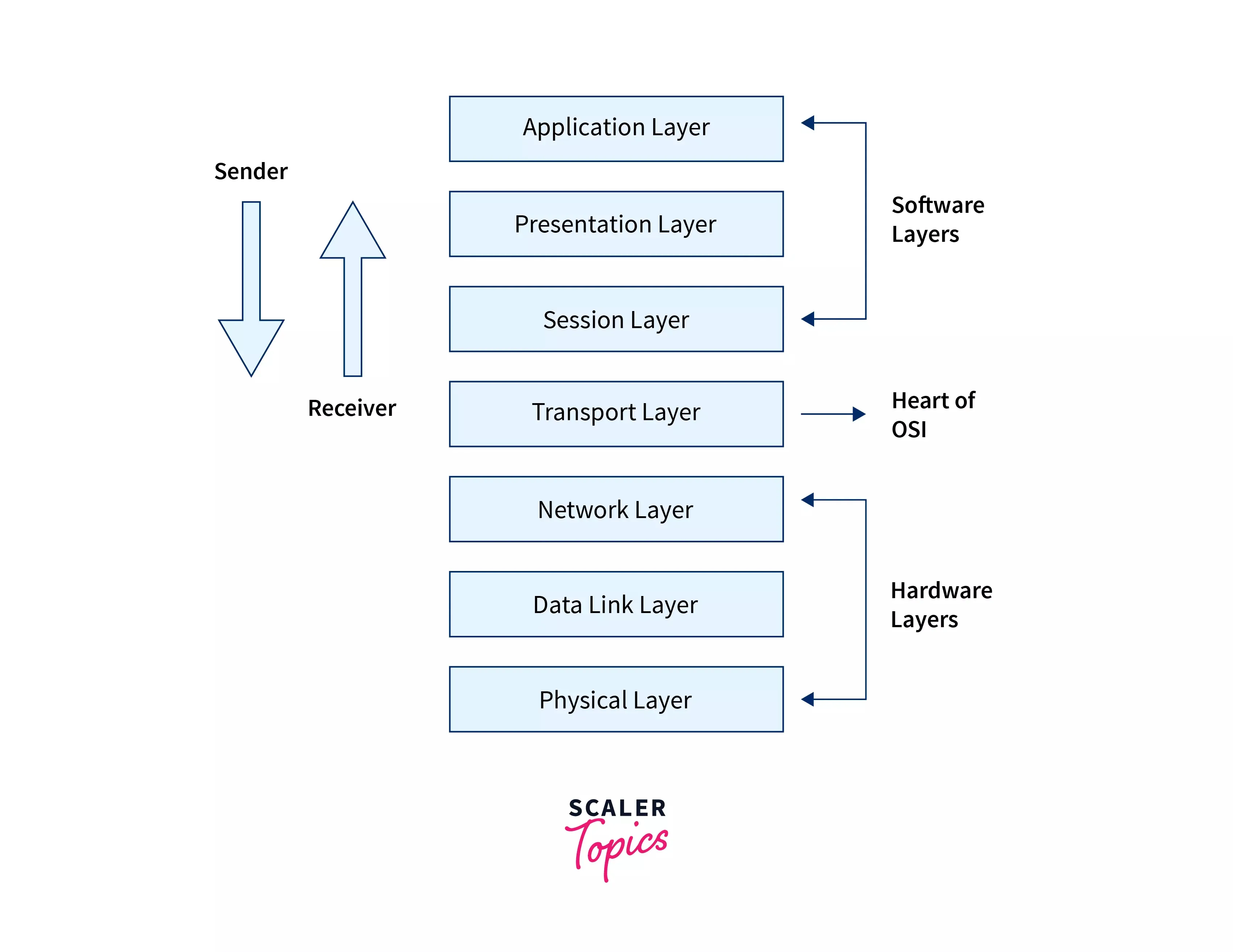
Before jumping into the core concepts let’s have an idea about TCP . TCP (Transmission Control Protocol) is a communication method that allows two computers to reliably send data to each other over the internet. In the OSI model layers , TCP operates at the Transport Layer (Layer 4) . Before any data is exchanged, TCP first establishes a connection between the sender and the receiver. Once connected, TCP makes sure that:
- All data reaches its destination
- Data arrives in the correct order
- Missing data is automatically resent
- The connection is properly closed when communication ends
So, In simple terms, TCP acts like a dependable delivery service that ensures data is delivered completely and correctly. Alright , now that we have a basic understanding of TCP , let’s see how we can create a simple TCP server in Java.
Main.java
import java.io.IOException;
import java.net.ServerSocket;
import java.net.Socket;

public class Main {
    public static void main(String[] args) throws IOException {
        int PORT = 2000;
        ServerSocket serverSocket = new ServerSocket(PORT);
        System.out.println("Server listening on port " + PORT);

        while (true) {
            Socket clientSocket = serverSocket.accept();
            System.out.println("New client connected: " + clientSocket);
            // next step is to read raw bytes from clientSocket InputStream
            // write response to OutputStream
        }
    }
}
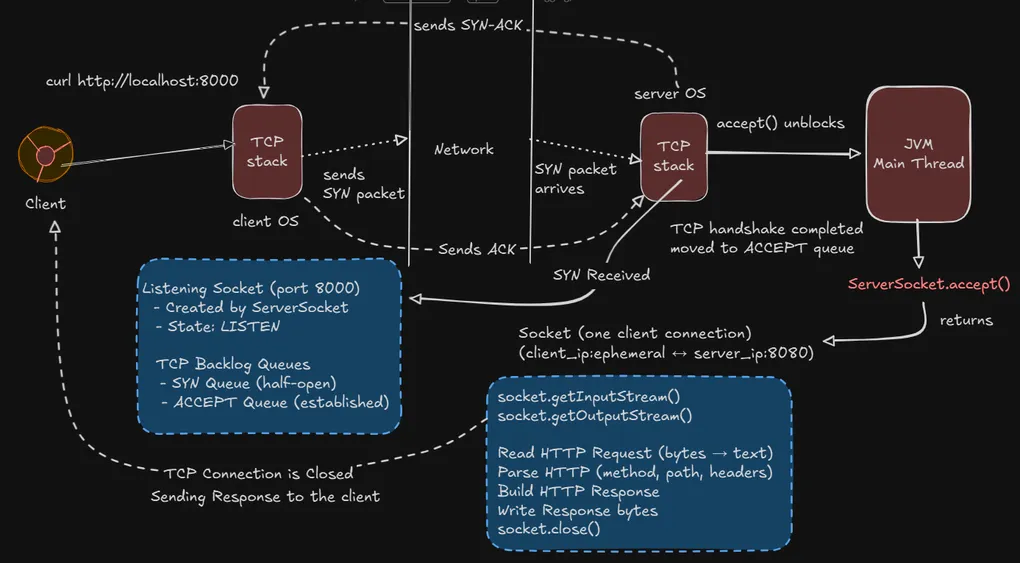
Here we open a listening socket on port 2000 and OS listens for incoming TCP connection attempts in this port , so here
ServerSocket serverSocket = new ServerSocket(PORT); creates the listening socket & Java asks OS kernel to bind this process to the port 2000 and start listening , more preciously JVM performs native system calls socket() bind() listen() and OS then performs few operations like
> Reserve the PORT 2000
> Associate it with this process
> Create an internal listening socket
> Create a **backlog queue** to hold incoming connection requests
> Stats accepting SYN packets on this port
btw , this backlog queue is a kernel managed data structure that holds incoming connection requests temporarily and exists only on the server side. from this point onwards the port is open , SYN packets are accepted and TCP handshakes can begin.
Now let’s say a client / browser wants to connect to this server
curl http://localhost:2000it doesn’t talk to HTTP immediately rather it first asks the OS to Resolve the address (eg. localhost -> 127.0.0.1 (IPv4) / ::1 (IPv6)) and open a TCP connection to the PORT 2000 , which is already opened in this case. Resolving the address means converting the human-readable hostname (like localhost) into a numeric IP address that the computer can actually connect to. This step is super necessary because a TCP connection requires an IP address and a port number . So before opening the TCP connection browser / client must know the exact IP address of the server it wants to connect to.
Now eventually after all this stuff is done , the 3-way TCP handshake begins between the client and server :
> Client → SYN
> Server → SYN-ACK
> Client → ACK
Client OS picks a random ephemeral port (e.g. 51111) & sends a SYN packet to the server’s IP address on PORT 2000 (client_ip:51111) -> (server_ip:2000) . The server’s OS receives this SYN packet and checks if there is a listening socket on that port. Since PORT 2000 is already opened, the OS finds it and adds the connection request to the backlog queue ( more preciously in a SYN queue for half-open connections cause modern TCP stack uses 2 releated queues one SYN and another one is accept queue for completed handshakes ). Then it responds with a SYN-ACK packet to the client, indicating that it is ready to establish a connection. The client then sends an ACK packet back to the server, completing the three-way handshake and establishing a TCP connection.
At this point, a fully TCP Connection is established , so until then ServerSocket.accept() blocks the application thread, after the handshake is complete, the connection is placed into the accept queue, and accept() returns a new Socket object representing that specific client-server TCP connection. Each client connection receives its own socket, while the ServerSocket continues listening for new connections.

Reading Raw Bytes from client socket
Now let’s read what the client/browser sends. In java , we can read raw bytes from the InputStream of the Socket object representing the client connection.
import java.io.BufferedReader;
import java.io.InputStreamReader;

InputStream inp = clientSocket.getInputStream();

BufferedReader in = new BufferedReader(
    new InputStreamReader(inp)
);

String line;
while ((line = in.readLine()) != null && !line.isEmpty()) {
    System.out.println(line);
}
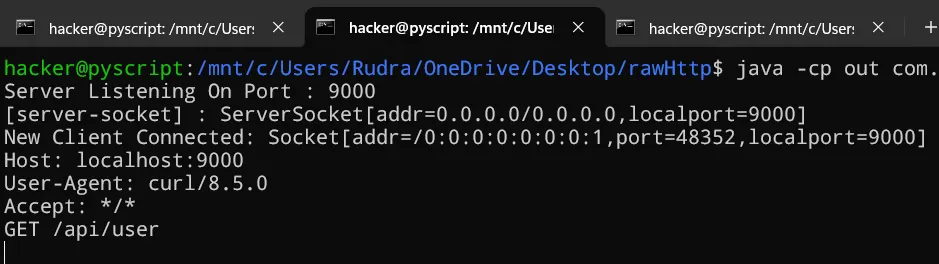
Here we create a BufferedReader to read text from the InputStream of the clientSocket. We read lines of text until we encounter an empty line, which indicates the end of the HTTP request headers. When you run the server and make a request using curl or a browser, you should see the raw HTTP request printed in the console, something like this:
Alright, so if you are curious about whats the purpose of InputStream InputStreamReader and BufferedReader here is a quick overview :
When a client connects to a server, data sent by the client travels as raw bytes over the network.
In Java, this incoming byte data is provided by the socket as an InputStream and it reads bytes not characters or text.
On the other side, InputStreamReader acts as a bridge between bytes and characters, It takes raw byte stream from the socket and converts those bytes into characters using a character encoding ( UTF-8 by default ) . This is important because HTTP requests are text-based and we need to interpret the bytes as characters to make sense of them.
Finally, BufferedReader wraps around the InputStreamReader to provide efficient reading of characters, arrays, and lines. It buffers the input, meaning it reads larger chunks of data at once and stores them in memory, which reduces the number of read operations and improves performance. It also provides convenient methods like readLine() to read text line by line, which is very useful for parsing HTTP requests.
Request Parsing
Now that we have the raw HTTP request, we need to parse it to extract useful information like the HTTP method, path, headers, etc. Here’s a simple way to do that in Java:
String requestLine = in.readLine();
System.out.println("Request Line: " + requestLine);

String[] parts = requestLine.split(" ");
String method = parts[0];
String path = parts[1];
String version = parts[2];
now we read the first line of the HTTP request, known as the request line, which contains the HTTP method (e.g. GET), the requested path (e.g. /), and the HTTP version (e.g. HTTP/1.1). We split this line into parts using spaces as delimiters and extract the method, path, and version. This is exactly what frameworks do internally .
Awesome, if you have read till now , you have a basic understanding of how TCP servers work and how to create a simple TCP server in Java that can accept connections , read & parse raw HTTP requests.
Write a raw HTTP response
Now that we can read and parse HTTP requests, let’s see how to send a raw HTTP response back to the client. An HTTP response consists of a status line, headers, and an optional body. Here’s a simple example of how to send a basic HTTP response in Java:
OutputStream out = clientSocket.getOutputStream();
String body = "Hello from the Java HTTP Server :/";

String response =
    "HTTP/1.1 200 OK\r\n" +
    "Content-Type: text/plain\r\n" +
    "Content-Length: " + body.length() + "\r\n" +
    "\r\n" +
    body;

out.write(response.getBytes());
out.flush();
When a TCP connection is established, communication is bi-directional:
One stream for incoming data. One stream for outgoing data.
getOutputStream() returns the stream used to send data back to the client , and java internally sends raw bytes over TCP also this OutputStream is simply pipe to the client’s TCP receive buffer.
Next, we need to manually construct the HTTP response as HTTP is a text-based protocol and we are building a low level server here so java does not help us to format HTTP , we must follow the HTTP specification to create a valid response.
Fine , now if you are also eager to know why we are using this \r\n in our response string , the simple answer is that
HTTP requires CRLF (\r\n) as a line terminator where \r = Carriage Return and \n = Line Feed . So every line in the HTTP response must end with \r\n , headers must be followed by an empty line and empty line is represented by \r\n\r\n .
Without this the client won’t know where the headers end and body begins , as a result the response may get rejected or parsed incorrectly.
Finally , when it comes to write the response we use out.write(...) method which internally writes the bytes to the java’s socket buffer & OS TCP stack packages them into TCP segments now data is queued for transmission to the client.
ATTENTION:
write() does not guarantee immediate network transmission. Data may stay in a buffer temporarily
So, here the flush() comes into the picture , it forces any buffered output bytes to be written out to the underlying stream immediately. without flushing , data might not reach to the client right away & that’s why its a good practice to flush the stream after writing the response.
Now when you run the server and make a request using curl or a browser, you should see the response Hello from the Java HTTP Server :/ displayed in the client.
Congratulations! You have successfully built a single-threaded HTTP server in Java that can accept connections, read and parse raw HTTP requests, and send raw HTTP responses back to the client. This server is quite basic and lacks many features of a production-ready HTTP server, such as handling multiple clients concurrently, supporting different HTTP methods, managing persistent connections, etc. However, it serves as a great starting point for understanding the fundamentals of how HTTP servers work under the hood.
In our next blog , we will enhance this server to handle multiple clients concurrently using thread pools , will add routing capabilities to handle different paths and methods, and implement more advanced features like persistent connections , timeouts and error handling. Stay tuned! & access full Source code here
If you enjoyed this blog , feel free to share your feedbacks and suggestions . Happy coding !